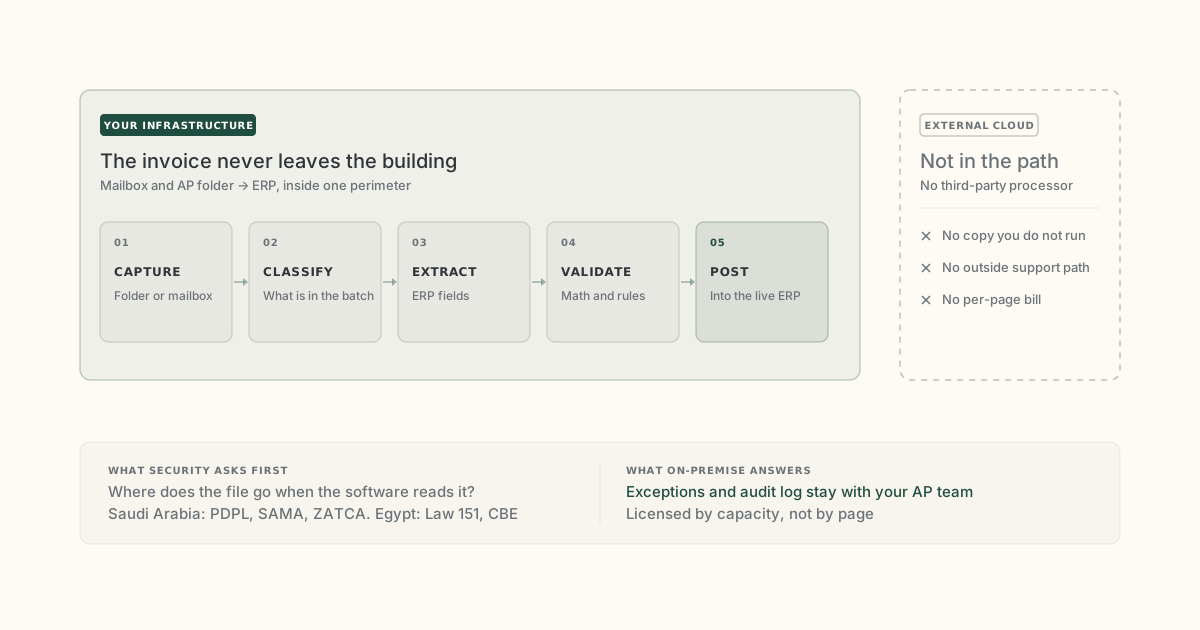
Accounts payable teams in Saudi Arabia and Egypt can stand up an invoice tool in weeks. Security teams then ask a question that has nothing to do with the software brand, and that predates every IDP tool: where does the file go when the software reads it?
A supplier invoice carries totals, tax, bank details, and often a name or a personal email. Finance and security already treat that file as sensitive. What they need to know in the room is whether the company can process the document without handing it to another party's processor.
On-premise invoice automation is the processing of incoming invoices inside the customer's own infrastructure: capture, classification, field extraction, validation, and posting to the ERP, without sending the document to an external cloud service. Intelligent document processing (IDP) is the layer that reads the file and turns it into fields. The loop around it ends with posting into the ERP.
How finance teams automate invoice processing inside the building
Take one incoming batch: a PDF from email and a scan dropped into the AP folder. Both files follow the same path.
- Capture. The file enters that folder or mailbox and stays there.
- Classify. The system decides what the batch contains: an invoice, an acceptance certificate, a delivery note, or two documents glued into one PDF.
- Extract. It pulls the fields the ERP will need — supplier, number, dates, tax, totals, and line items when posting requires them.
- Validate. It checks that required fields are present, that the math holds, and that the record matches the shape the receiver accepts. When the ERP still rejects a document the system has already read, the error happens after recognition. That narrower problem is covered in Why Invoice Automation Fails After OCR.
- Post. The accepted record is written into the ERP the company already runs. What the model cannot defend goes to a person in AP who works inside the same perimeter.
Why Saudi and Egyptian teams run invoice processing without the cloud
For regulated desks in both countries, on-premises processing is the default starting point. Teams review who processes the file and under which contract. They also ask whether support outside the company can open it.
Each Saudi framework covers a different review. The Personal Data Protection Law (PDPL) still leaves room for cloud tools. A cross-border transfer of personal data is conditional, and legal has to defend that condition for as long as the arrangement runs. For banks, reviews under the Saudi Central Bank (SAMA) usually keep automation that touches customer and financial records in the same supervised environment as the data. For AP, the Zakat, Tax and Customs Authority (ZATCA) treats an invoice as a controlled financial object. This article is not a guide to FATOORAH, ZATCA's e-invoicing platform. Clearance is the seller's outbound path. Inbound AP still receives mixed batches: cleared files from local suppliers, and ordinary PDFs and scans from everyone else.
Egypt is a separate map: its data protection law (Law No. 151 of 2020) sets its own rules for sending personal data abroad, and banks answer to the Central Bank of Egypt on confidentiality and outsourcing, so SAMA and ZATCA do not apply to a Cairo AP team by name.
Someone in the meeting usually objects that an in-country cloud region is not the same as the company's own servers. The file may never cross a border and still leave the building, because another controller now holds it in a shared multi-tenant environment, with a support path the AP team does not run. On-premises processing removes that question. A local region answers it, and finance and security have to accept the residual risk.
Some flows can live in that region. If the batch carries no individual data and the process does not need an air-gapped room, cloud inside the country can work — and security has approved the contract. Where that line sits is for the company's own security and legal teams to draw.
AI Server as the document engine
The full loop described above is what Primo AI Server runs on the customer's infrastructure. The same email PDF, an invoice and an acceptance certificate in one file, is classified there. Analysts and RPA developers configure extraction in the interface on around 50 labeled samples, without a separate machine-learning team. Doubtful fields go to a person, and a Primo robot posts the finished record into the ERP the team already uses, including through a screen when there is no clean API.
On-premises invoice automation keeps the exception queue and the audit log with the company's AP staff, in the same perimeter as the ERP. The models run on local servers. Lighter extraction can run on CPU; a high-volume vision stack usually needs GPU servers. A pile that needs that vision stack, with no budget for GPU hardware, is a poor fit.
Deployment is on-premises, including air-gapped. Licensing is by capacity, not by page. With external services disabled, documents do not leave customer infrastructure.
The engine is also a poor fit for primarily handwritten or very low-quality scans, and for highly variable layouts with no labeled samples. Those limits are listed on the AI Server page.
When cloud tools still fit
Cloud invoice tools fit when the file is allowed to become someone else's processing job. That usually means lower regulatory weight and no air-gap. These tools are often faster to switch on. At volume the cost is frequently per document.
On-premises invoice automation fits when the file must stay inside the building: banks and adjacent perimeters, air-gapped rooms, AP teams that will not send supplier invoices to a third-party model, and programmes that need document cost to stay predictable as volume grows.
Four questions are enough to choose:
- Where does the file go?
- Who sees the exception?
- What happens to cost when volume jumps?
- How does the record enter the ERP already in production?
See Primo AI Server for on-premises classification and extraction on capacity licensing. If the remaining pain is the shape of the posting, not the location of the file, continue with Why Invoice Automation Fails After OCR.
FAQ
Can we automate invoice processing if documents cannot leave our network?
Yes. Capture, classification, and extraction run next to the folder. Posting goes into the company's ERP. A person in AP handles the cases the model should not close.
Is a local cloud region the same as on-premise invoice automation?
A local region keeps the file in-country. On-premises processing keeps it on infrastructure the company operates. Security reviews those two designs as different arrangements.
Does this replace ZATCA clearance?
No. Clearance is how a seller issues a tax invoice through FATOORAH. This article is about the inbound AP batch.