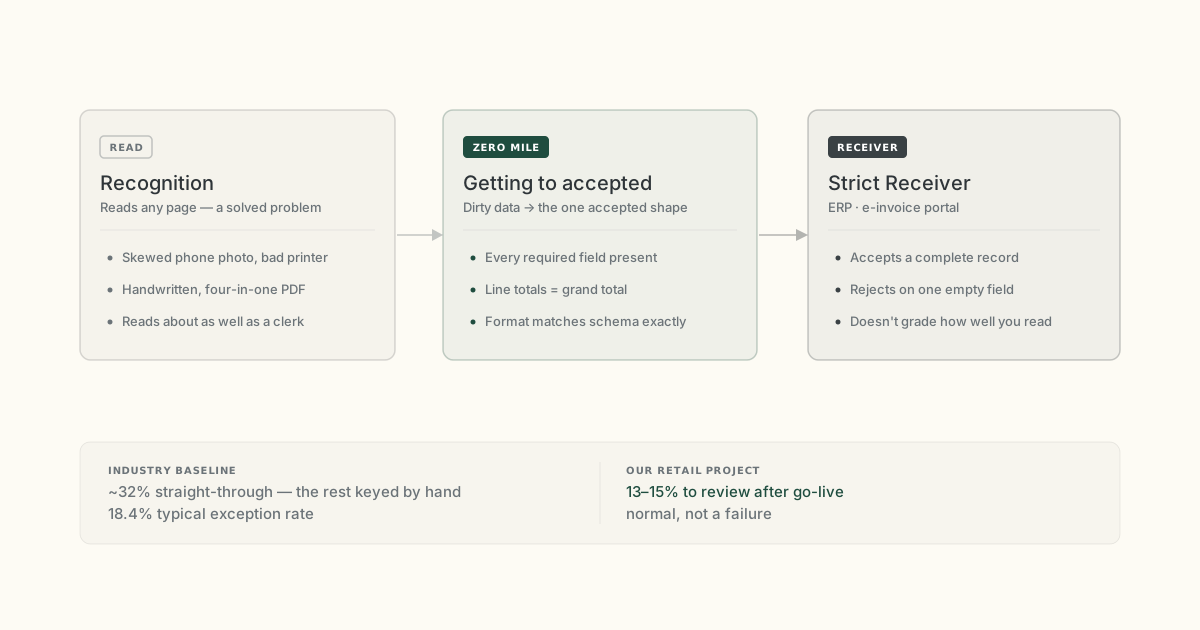
OCR is a solved-enough problem. Getting incomplete, math-broken data into the one shape your ERP will accept is not.
Key takeaways
- The document is rejected after it has been read — over a required field, a broken total, or a format mismatch, none of which better recognition fixes.
- There are five honest ways to handle dirty documents; each is genuinely right for some flow, and one of them is more headcount.
- AI extraction plus RPA fits high volume of non-uniform documents — and it is the wrong, too-expensive choice below that.
- On our own retail project, 13–15% of documents still went to a person after go-live. That is normal, not a failure.
- The only way to know where your own model-versus-human line sits is to measure it on your thirty ugliest documents.
A retail chain we worked with had one supplier folder that arrived every morning looking about the same.
A broken Excel file that would not open on the first try. A single PDF with four different documents scanned into it — a delivery note, an invoice, a quality certificate, and one page nobody could name. A sheet printed on a tired office printer, then signed by hand, then photographed on someone's phone under a desk lamp.
All of it had to be inside the accounting system by end of day. A person read it, typed it in, checked it, and pressed save.
The system refused.
One required field was empty — a tax code the paper never carried in the first place. A document a human had already "finished" came straight back.
It's not a reading problem
Most tools get one thing wrong about this. They treat it as a recognition problem, so they compete on how well they read a bad scan.
Reading has been good enough for years. A modern model reads a skewed phone photo about as well as a tired clerk does. The document still gets rejected, and it gets rejected after the reading is done.
The receiving system does not grade you on how well you read the page.
It checks whether every required field is present, whether the math ties — line totals against the grand total, base times rate against the tax amount — and whether the format matches its schema to the character.
I call this the zero mile: getting dirty data into the exact shape a strict receiver will accept at all. It sits after recognition, and it is where the real cost lives.
If you are one step earlier than that — still deciding whether a template reader covers your pile or you need a full extraction layer — the comparison is in Intelligent Document Processing vs OCR.
A perfect read of the page does not give you an acceptable record, because the field that is missing was never on the page. One large ERP vendor's own documentation is blunt about it — turning on electronic invoicing changes, at a structural level, how the system stores and validates invoice data, because the fields a receiver now demands may have no slot anywhere in the source system's data model.
A strict receiver, by design
A strict receiver is unforgiving on purpose. Saudi Arabia's e-invoicing system, ZATCA, in its integration phase, wants each invoice as a structured XML document that carries a running counter with no gaps, a hash chaining each invoice to the one before it, and a valid device certificate.
If a mandatory field such as the invoice type code or the tax amount comes through empty, or the line items do not sum to the declared total, the portal rejects the whole thing — regardless of how clean the scan was.
And even shops that already automated part of their flow still touch about two-thirds of their invoices by hand; the industry-average straight-through rate sits near 32% (Ardent Partners, 2024). A fully manual desk, by definition, touches every single one.
The same logic applies outside finance. NPHIES claim submission in Saudi Arabia validates structure at the point of submission: a mismatched code or a missing attachment fails the claim before anyone reads it. The strict receiver is the design, not the exception.
Five ways to attack this, honestly
There are five real ways to attack this, and each of them is genuinely the right answer somewhere. I have shipped projects on more than one of them, so I will say where each breaks too.
1. Hiring people, or hiring for the peak
At low volume, or for the odd one-off document no automation could ever learn, a person is simply the cheapest and fastest option — nothing to build, nothing to maintain.
It breaks on scale and, worse, on repeatable peaks. The full-cycle cost of processing one invoice runs about $9.87 on average (Ardent Partners, 2024), and older laggard-tier benchmarks put shops that still run mostly by hand at $18 to $26 (Aberdeen, 2010 — so treat it as a direction, not a current price). Those are cycle costs, not keystroke costs.
In our own projects I have watched a clean document take a couple of minutes and a bad one eat twenty — because on a photographed, hand-signed page where the numbers do not add up, the person is not typing, they are investigating. Multiply that by a seasonal peak and you are hiring bodies for three months a year.
2. Template-based OCR
When your documents are uniform and stable — same supplier, same layout, month after month — a template that reads fixed positions is fast, cheap, and accurate.
It breaks the moment the layout moves. This is the most common trap, so it earns the most room here.
Template extraction anchors each field to a coordinate or a nearby keyword, and a photographed bad-printer page is never pixel-stable, so the anchor drifts and the field comes back wrong or empty. Practitioners on a major RPA platform's own community forum describe it exactly: a few hundred invoices a week, "the supplier invoice format not fix," and the reader stops working. An open-source invoice-parsing library used with a self-hosted ERP says it out loud in its error message — the PDF invoice does not match any known template it ships with — every time a document falls outside the shipped set, a failure users have reported across years.
The retail chain I opened with is the reason this matters. Those suppliers gave the best price and the quality the business actually wanted, so a bit of sloppiness in the paperwork was forgiven — and no purchasing team on earth was going to force forty of them onto one invoice template.
With template OCR, the dirt stays with you.
3. Boxed and industry-specific solutions
If your input is already clean and already matches what the box expects, these are excellent — someone has done the compliance work so you don't have to.
They break because they assume clean input. A compliant e-invoicing network will happily validate your document and reject it, but it will not fix the source data that made it invalid. The recurring errors are all upstream: a supplier who types "N/A" into a mandatory field, an empty line left over from converting a PDF, a missing buyer reference. The box handles issuance. The dirt stays upstream, with you.
4. Full custom integration, or replacing the source system
When you own the source system, and you have the time and the budget, a real integration is the honest long-term answer — an API is a stable contract, and everything above is a workaround for not having one.
It breaks on the systems you do not control. One experienced independent engineer frames it as the first question he asks of any automation: is there an API? Legacy systems without one force you to drive a screen, and screen automation is fragile by design.
It also breaks on the suppliers, because no integration you build on your side can compel an outside vendor's ERP to emit a valid format — and there is a well-documented case of a current, well-maintained ERP putting the wrong identifier scheme on a required field and getting its own output rejected, so "just modernise the source" is not the clean cure it sounds like. These projects run in quarters, sometimes years.
5. AI extraction plus RPA
This is the option that fits high volume of non-uniform dirt — the retail case exactly. It has real limits, cost being the sharp one, and I will get to those. First, what it actually looks like.
What the loop actually looks like
The loop has four steps, and the order matters more than any single model in it.
A vision model reads the document — any layout, photographed or not — and returns the fields together with a confidence score for each one. Not one score for the page: one per field, because a document can be 95% readable overall while the tax ID sits below threshold and needs a human eye.
Then a second layer, plain deterministic code and not the model, re-checks the math. It recomputes each line as quantity times price, sums the lines against the subtotal, applies the stated rate to verify the tax, and confirms the grand total, with a cent or two of rounding tolerance so it doesn't false-alarm.
This has to be separate code, because an LLM predicting a number is sampling from text it has seen rather than calculating — asking the same model to check its own arithmetic just adds a second guess. Trust runs from the deterministic layer to the model, never the other way.
The point of all this is the honest "not sure."
A vision model, when it cannot read a value, will invent one that fits the vibe of the document and hand it over with full confidence — and a confidently wrong amount that sails into the ledger is far more dangerous than a field flagged for a human. So a doubtful field never goes to the receiver silently. It goes to a review station where a person clears it.
The deterministic check only catches numbers that disagree with each other; it cannot catch a wrong value that is internally consistent, which is why the human stays in the loop and why "100% touchless" is a slide, not an operating reality.
We build this loop on Primo AI Server for the extraction and the per-field confidence, with Primo closing both ends — pulling data out of a legacy system through its screen when there is no API to call, and typing the finished record into the receiver the way a person would. The same two pieces cover the whole path, from the folder of bad scans to the record the strict system accepts.
On our retail project, after go-live, 13 to 15% of documents went to a person for review — not 1%, and not zero. An independent AP benchmark puts the industry exception rate at 18.4% (Ardent Partners), so that number is normal, not a failure. The pilot took two months and went straight into production. The company avoided hiring four people for that folder.
Primo AI Server processes structured and unstructured documents — invoices, contracts, claims, statements, foreign trade paperwork — and powers AI agents and decision-making across automated workflows. Deployed on-premises. Licensed by capacity, not by page volume.
How to choose, and when not to use AI
I sell this loop, so hear the next part carefully: on many flows you should not buy it.
AI in the loop means GPUs, and a GPU running at 10% utilisation costs about ten times more per unit of work than one kept busy — and document intake, with its peaks and quiet weeks, almost never keeps a GPU busy.
Below roughly a thousand to ten thousand documents a month, on a uniform layout, template OCR or even a person wins outright, because at that volume the real cost is building and watching the pipeline, well above the reading itself.
Self-hosting your own model only starts to pay back around 50,000 to 100,000 pages a month of steady volume, and only if you already have a dedicated — or at least quarter-time — ML engineer on staff. And in one engineering breakdown, the human review queue alone was $0.75 of a $1.20 per-document cost — more than the OCR and the AI layers put together.
So the four things worth measuring before you spend anything: how much volume you really have, how uniform the documents are, whether the source system has an API, and how hard the deadline pushes.
Count first. If the numbers say template OCR, the honest vendor tells you to buy template OCR.
The line you can only draw yourself
Where the model stops and the human starts is a real line, and it is different for every document flow.
I cannot tell you from a slide whether yours lands at 5% review or 25%, and I would not trust anyone who could.
The only way I know to find it is to take your own thirty ugliest documents — the broken Excel, the photographed signature, the page four-scans-deep — and run them through the loop, and see how many the machine hands back.
Bring us your thirty ugliest documents
That test is exactly how we start a pilot. Send us the worst of what your suppliers and systems throw at you, and we will run them through the loop on Primo AI Server and Primo, show you the per-field confidence, the exceptions, and the honest review rate — before you commit to anything. You will see your own number, not ours.
Request a pilot / book a demo →
Alexey Nikolaev works at Primo, where the team builds document-automation and RPA systems for finance and back-office operations. Primo develops Primo AI Server and the Primo platform.